Product Updates · November 2, 2026 · 4 min read
Introducing Kolo Sites Forms: collect answers right in Kolo
Kolo Sites can now collect answers. Turn on a form and the people who open your site can send you leads or survey replies that land right in your Kolo.
By Paul Willmes, COO, Head of Product at Kolo
Kolo Sites could show your data. Now they can gather it too
When we launched Kolo Sites, a site was something to read: a dashboard or a report your Kolo built from your connected data and kept current. The one thing it could not do was collect anything back. Plenty of you asked for exactly that, so here it is. A Kolo Site can now be a form, and the answers land right in your Kolo.
Ask your Kolo for a lead form, a request page, or a short survey, and it builds the site the same way it always has. The difference is that you can now turn on a form, and the people who open the site can send you answers.
How it works
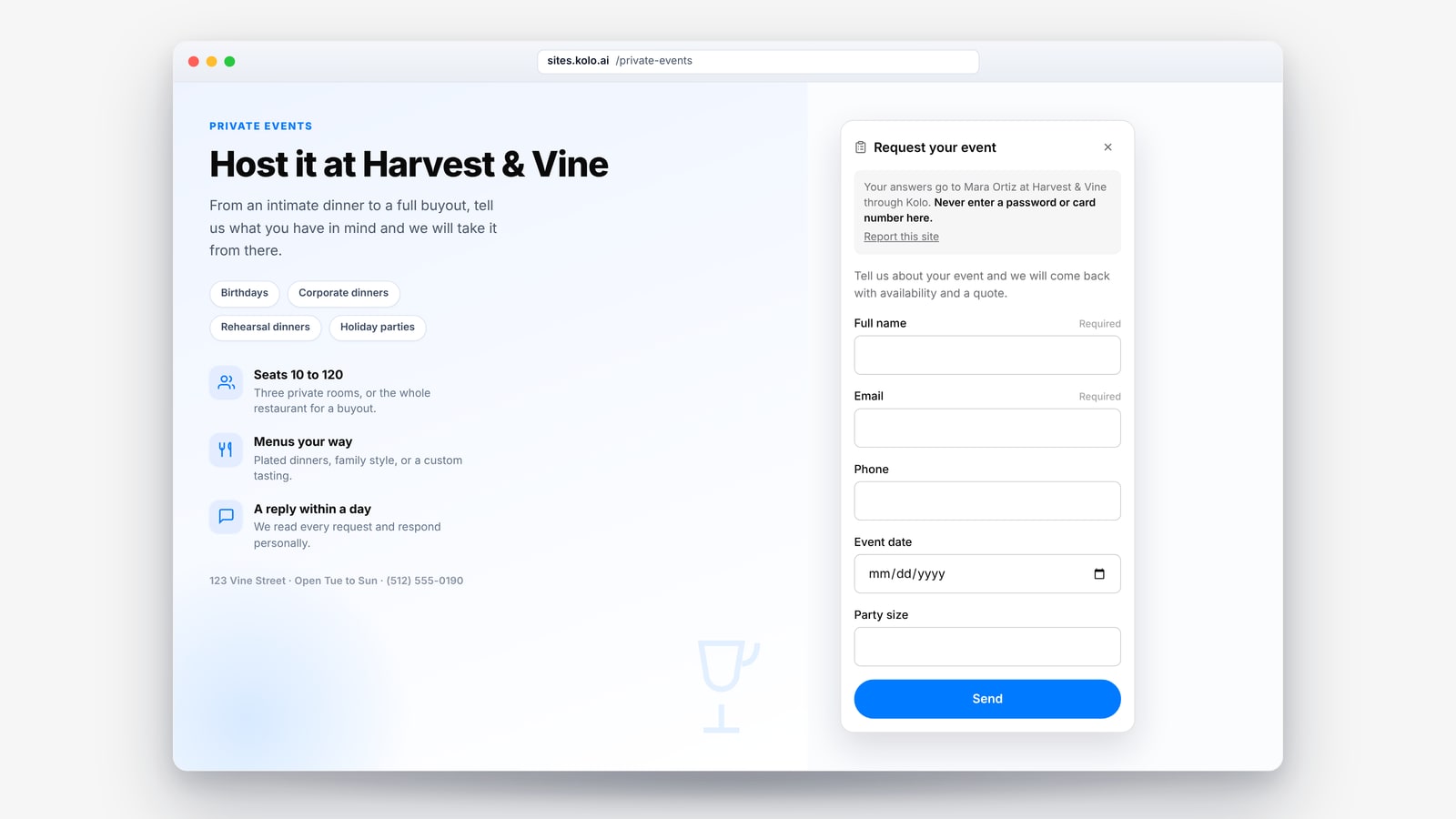
The form itself is built by Kolo, not by loose code on the page. You pick what to ask for from a fixed set of field types: a short answer, a longer message, an email, a phone number, a date, a number, a one-to-five rating, a checkbox, or a multiple-choice question. Kolo renders those fields with clean chrome that shows your name and your workspace, so whoever fills it in knows the answers are coming to you through Kolo.
A form is off until you turn it on, and only the owner can turn it on, because the answers come to you. Once it is on, everyone who can open the site sees the form, under the same sharing controls as the rest of Sites: your whole workspace, specific people, anyone with the link, or outside people you invite by email.
When answers come in, they collect in a Responses list on the site, in both the Kolo portal and the app. A new response pings you with a note in your main chat and an email, neither of which includes the answers themselves. You can read them, mark them as seen, export the whole set to CSV, and delete any or all of them. And because this is Kolo, your Kolo can read the responses when you ask and act on them, drafting a reply or adding a lead to your CRM, with the consequential steps paused for your approval.
Ten ways teams are already using it
Here is where forms earn their keep across the businesses we work with most.
Restaurants and hotels
- Private events and large parties. A booking page that takes the date, party size, and contact details, so your Kolo can come back with availability and a quote.
- Catering requests. Event date, headcount, dietary notes, and budget in one place, instead of a dozen back-and-forth emails.
- Group blocks and meetings. A room-block or events RFP page for hotels, so a planner's request lands as a lead your sales team can work the same day.
- Post-stay guest surveys. A quick one-to-five rating with room for a comment, so you hear about a problem while you can still fix the relationship.
Law firms and consultants
- New-client intake. A consultation request that captures the matter type, a short description, and preferred times, so your Kolo can start the intake and tee up a conflicts check for your review.
- Discovery and scoping. For consultants, a project page that asks for scope, timeline, and budget range, so a first call starts from real detail instead of a blank slate.
- Webinars and waitlists. A simple name-and-email sign-up for a session, a waitlist, or a newsletter, captured straight into your list.
Real estate
- Buyer and seller leads. A capture form on a listing or market-report site, so an interested buyer or seller reaches you with their timeline and price range, ready to add to your CRM.
- Home-valuation requests. A "what is my home worth" page that collects the address and contact details and hands your Kolo everything it needs to follow up.
- Showing requests and open-house sign-ins. A page that takes the property and a preferred time, so your Kolo can propose showing slots without the phone tag.
Safe by the way it is built
Letting strangers send you anything is where most tools get risky, so this one is careful on purpose. Because the form is built by Kolo from a fixed set of field types, a site cannot ask for a password, a card number, or a file upload. Answers are stored encrypted at rest, so a database read outside the app does not expose them. Collection stays off until a person turns it on, your workspace admins can switch it off entirely, and every follow-up your Kolo takes on a response runs through the same risk-tiered approvals and exportable Audit Trail as the rest of your work. It is the read-only safety of Kolo Sites, now with a front door you control.
Put a form on your next site
If you already have a Kolo Site, adding a form is one request away. If you do not, ask your Kolo for the page you have been meaning to build, a lead form, an event page, a survey, and turn the form on when you are ready. To see Sites, forms, and the rest of Kolo working for your team, Book a Demo.
Frequently asked questions
How do I turn a site into a form?
Ask your Kolo to add a form to a site, then turn it on from the site's Form control in Kolo. A form is off by default, and only the owner can turn it on, since the answers come to you.
Where do the answers go?
Into a Responses list on the site, in the Kolo portal and app. You get a note in your main chat and an email when new ones arrive, you can export everything to CSV, and your Kolo can read the responses when you ask and act on them for you.
Who can fill in the form?
Anyone who can open the site, under the same sharing controls as the rest of Sites, from your whole workspace to specific people, anyone with the link, or outside people you invite by email. You choose who can open the site, and the same people can send the form.
Is it safe to collect answers this way?
Yes. The form is built by Kolo from a fixed set of field types, so a site cannot ask for a password, card number, or file. Answers are encrypted at rest, forms are off until you turn one on, and anything your Kolo does with a response still goes through risk-tiered approvals and the Audit Trail.